If you cook often and like precise, repeatable results, an app-controlled mixer grinder can save time and reduce mistakes with presets, remote start, and real-time alerts. You’ll get diagnostics, firmware updates, and smart-home integration that improve safety and convenience, but you’ll also face privacy trade-offs, connectivity quirks, and higher cost. Before you decide, consider how much those features matter in your daily routine and where they might fall short.
Key Takeaways
- App control adds convenience: remote start/stop, presets, and scheduling for repeatable recipes and unattended tasks.
- Safety improves via app locks, lid sensors, real-time diagnostics, and emergency shutdown alerts.
- Maintenance is easier with automatic cleaning cycles, usage logs, predictive alerts, and firmware-updated diagnostics.
- Privacy and security depend on encrypted connections, signed firmware, opt-outs for data sharing, and transparent policies.
- Not essential for everyone: local controls, correct jar fit, and physical interlocks remain critical if connectivity fails.
How App Control Changes Everyday Mixing Tasks
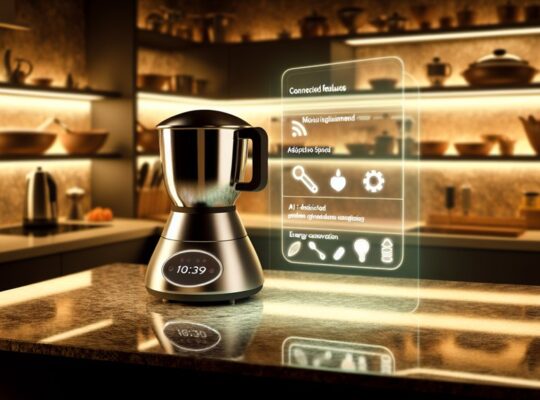
How does app control change the way you handle everyday mixing? You get remote access to start, stop, and schedule cycles, so you can avoid leaving food unattended and reduce risk of overheating or spills. The interface lets you select precise speed presets and duration, which helps maintain consistent texture without guesswork. Real-time monitoring shows motor load and blade status, alerting you to jams or overheating so you can cut power before damage or injury occurs. Safety interlocks tied to the app prevent operation if lids aren’t secured, and firmware updates can patch vulnerabilities that might otherwise compromise safe operation. You’ll appreciate automation for repetitive tasks—pulse patterns for grinding or timed emulsification—because it minimizes manual intervention and potential mishandling. Connectivity also supports voice assistants and routines, letting you integrate the appliance into a kitchen safety workflow. Overall, app control increases control, predictability, and protective feedback, but you should still follow manufacturer safety guidance. Modern app features can also report metrics like motor load and expected runtime to help compare models and maintenance needs.
Key Smart Features to Look For
Now that you can control cycles, monitor motor load, and automate routines from your phone, it helps to know which smart features actually matter when comparing app-controlled mixer grinders. Look for real-time motor diagnostics that warn you of overheating, stall conditions, or unusual vibration so you can stop the unit before damage occurs. Prioritize secure, authenticated app connections (encrypted pairing, two-step setup) to prevent unauthorized control. Choose models with granular speed and pulse control in the app rather than fixed presets; that gives you safer, precise handling for different ingredients. Check for scheduled maintenance alerts and consumable tracking (seal wear, blade sharpness) to maintain safe operation. Opt for apps that provide clear error codes and suggested corrective steps instead of vague messages. Finally, prefer units with manual override and physical safety interlocks so you can immediately disable the grinder if the app or network fails—safety-first design reduces risk in everyday use. Also consider units with predictive maintenance to receive proactive alerts that extend appliance life and reduce downtime.
Performance and Reliability Trade-offs
Which matters more to you: raw power or consistent uptime? You’ll often trade peak motor torque for fewer electronic failure points when choosing an app-controlled mixer grinder. High-power units handle tougher tasks faster but generate more heat and stress on sensors, relays, and belt or coupling interfaces; without robust thermal management and rated components, app features like auto-speed profiles can accelerate wear. Conversely, designs that prioritize reliability lean on conservative power ratings, simpler control boards, and hardened connectors, reducing app-driven failures but limiting throughput. You should evaluate rated duty cycles, thermal cutouts, ingress protection, and serviceability — not just peak RPM or wattage. Also check firmware update policies and rollback options: a pushed update that’s buggy can render safety interlocks nonfunctional. Finally, insist on clear warranty terms covering electronic modules and a documented maintenance schedule to minimize downtime and keep both performance and safety predictable over the product’s lifespan. Regularly inspect cords, plugs, and seals and keep the unit dry to reduce electrical and fire risks cord and plug.
Usability: Learning Curve and App Design
Performance and reliability considerations will only matter if you can actually use the app features without frustration, so usability and learning curve are a practical follow-up. You’ll want an interface that’s intuitive: clear icons, minimal steps to start or stop, and prominent safety prompts for locking, child-safety, and emergency shutoff. Tutorials and contextual help should be brief and actionable — think one-tap demos or short walkthroughs rather than dense manuals. Responsiveness matters; lag between command and device response undermines trust and can create safety risks. Customization should be straightforward: saved presets, adjustable timers, and visible status indicators (motor temperature, blade lock) reduce error. Accessibility features — large buttons, voice control, haptic feedback — improve safe operation for varied users. Security also affects usability: simple authentication that doesn’t impede emergency control balances convenience and protection. Overall, you’ll judge usefulness not just by features but by whether the app lets you operate the grinder quickly, predictably, and safely. Consider also whether the app provides model-specific guidance for sound-dampening design and other noise-reduction features.
Integration With Smart Home Ecosystems
When you connect an app-controlled mixer grinder to your smart home, check voice assistant compatibility so you can control it hands-free and confirm which commands are supported. Look at automation and routines to see if you can schedule runs, link it to cooking scenes, or trigger it from other sensors. Also verify data privacy controls—what usage data is shared, how it’s stored, and whether you can opt out. Also confirm the device’s overload protection and safety features to ensure motor longevity and prevent damage.
Voice Assistant Compatibility
Curious how a mixer grinder fits into your smart home? If it supports voice assistants like Alexa, Google Assistant, or Siri, you’ll be able to issue hands-free commands for basic functions—start, stop, set speed levels, or query status. Check compatibility lists and required firmware versions before buying; mismatches can prevent secure pairing. Use voice control only for non-critical tasks—avoid commands that could bypass safety interlocks or start the appliance without the jar lid secured. Enable account-level protections: voice purchase or command PINs, and limit third-party skill permissions. Verify that voice traffic is routed securely and that the manufacturer issues updates for voice integrations. When configured properly, voice control can add convenience without compromising safety. Also, follow regular maintenance like inspecting blades and seals to ensure safe, long-lasting operation.
Automation and Routines
How will an app-controlled mixer grinder fit into your broader smart-home routines? You can schedule grinding cycles, chain actions with other devices, and enforce safety checks before operation. Consider scenarios that make the system practical and secure:
- Morning routine: coffee beans ground, cooker preheated, exhaust fan on.
- Post-work prep: lights dim, recipe starts, grinder runs at low speed with timer.
- Emergency stop: smoke detected, grinder halts, notifications sent.
You’ll want routines that verify lid closure, motor temperature, and timed auto-shutoff to reduce risk. Integration with hubs (Matter, HomeKit, Alexa) makes coordination simpler, letting you trigger context-aware recipes while maintaining safety interlocks. Test routines manually before relying on automation. Many modern units also include thermal cut-off protection to prevent motor damage and overheating.
Data Privacy Controls
Why should you care about data privacy controls when integrating an app-controlled mixer grinder into your smart-home ecosystem? You’ll be sharing usage patterns, voice-command logs, and device status with platforms that aggregate data. Check what telemetry is collected, whether it’s anonymized, and how long it’s retained. Prefer devices that let you opt out of nonessential data sharing, disable cloud backups, or keep local-only control via your home hub. Review permission scopes the app requests and limit integrations to trusted ecosystems that enforce end-to-end encryption and regular security updates. Also verify vendor transparency: clear privacy policies, breach notifications, and the ability to delete your account and data. These steps reduce exposure and keep your kitchen safer. Manufacturers’ warranty terms also affect safety and repair expectations, so review coverage for motor, switches and service network availability before you buy.
Safety, Maintenance, and Automated Cleaning
You’ll want to check how app-controlled mixers handle safety—features like child locks and lid sensors can be enabled remotely to prevent accidental starts. Regular maintenance gets easier when the app logs usage and alerts you to blade wear or gasket replacement. Also evaluate self-cleaning cycles that automate rinses and sanitize routines, saving time while reducing manual disassembly. Consider whether the app lets you select appliance power modes for appropriate wattage to avoid overheating and match your cooking tasks.
Child Lock and Sensors
Wondering how app-controlled mixer grinders keep curious hands and accidental starts at bay? You get layered protection: an app-enabled child lock that prevents power-on without a confirmation code, plus sensors that verify lid closure, jar seating, and motor temperature before operation. These systems minimize risk and let you monitor status remotely.
- Visualize a locked icon on your phone — grinder disabled until you unlock it.
- Picture sensors refusing to start when the jar is misaligned — a physical interlock.
- Imagine automatic shutdown if vibration or temperature thresholds are exceeded — preventing damage or fire.
You’ll appreciate that firmware updates can tighten safety logic, and logs let you audit incidents, keeping operation transparent and controlled. A well-chosen stainless steel jar and durable blade material further enhance safety and longevity.
Self-Cleaning Cycles
Beyond keeping kids and accidents at bay, app-connected safety features also set the stage for automated maintenance like self-cleaning cycles. You’ll be able to start a calibrated wash cycle from your phone that uses measured water, detergent, and rotation patterns to flush residue without disassembly. The app can suggest cleaning frequency based on usage, notify you when seals or blades need inspection, and lock operation until a cycle completes to prevent misuse. Remote diagnostics let the manufacturer recommend specific programs for stubborn buildup or hard-water scaling. That reduces manual contact with sharp components and lowers contamination risk. You’ll still perform periodic deep inspections, but automated cycles make routine maintenance safer, more consistent, and easier to schedule.
Privacy, Security, and Data Concerns
How much of your kitchen life are you willing to let a manufacturer—or a third party—collect and store? You’ll want to consider what data the app accesses (usage logs, recipes, voice commands) and why. Security matters: weak Wi‑Fi, unencrypted telemetry, or default passwords can expose your network. Check firmware update frequency and whether updates are signed.
Think visually about risk vectors:
- Smart hub or router as a single point of failure.
- Cloud servers holding metadata about when you cook.
- Companion apps with broad permissions on your phone.
You should insist on transparent privacy policies, minimal data retention, and clear opt‑out controls. Look for manufacturers that adopt end‑to‑end encryption, local‑first modes, and independent security audits. If you can’t verify practices, treat the device like any other networked sensor: limit its access (guest networks, firewall rules) and monitor unusual activity. That balance keeps convenience without compromising household safety.
Cost Versus Value: Is It Worth Paying More?
You’ll need to weigh the upfront price of an app-controlled mixer grinder against the practical features you’ll actually use, like programmable routines or remote monitoring. Consider long-term cost benefits such as energy savings, reduced repair visits, and firmware updates that can extend the appliance’s lifespan. If the premium aligns with measurable convenience and lower running costs, paying more can be justified; if not, a simpler model may be smarter.
Price vs. Practicality
Wondering whether the extra features and app integration justify a higher price tag? You’ll weigh practical benefits against sticker shock: safety interlocks, remote monitoring, and precision controls can reduce accidents and waste, but they add cost. Think about real use cases and whether smart functions replace habits or just add complexity. Picture scenarios to decide:
- A busy parent starting a safe, automated grind while supervising kids.
- A tech-savvy cook dialing exact pulse patterns for consistent texture.
- A cautious homeowner receiving alerts when lids aren’t secured or motors overheat.
If those situations match your routine, paying more can be practical. If not, a basic, well-built model often gives safer, more reliable performance without unnecessary expense.
Long-term Cost Benefits
If the smart features you just considered fit your routines, the next question is whether they deliver measurable savings over the product’s lifetime. You’ll weigh higher upfront cost against reduced energy use, maintenance and replacement frequency. Smart motors with torque control and scheduled operation can cut electricity bills modestly; look for verified efficiency ratings. Remote diagnostics and firmware updates may lower service visits and extend component life, but only if the manufacturer supports updates long-term. Consider warranty length and cost of proprietary parts: an initially pricier model can be cheaper overall if repairs are covered and spares are available. Prioritize safety features that prevent misuse and overheating—these reduce failure risk and hidden costs. Do the math: projected savings versus price premium determines real value.
Real-World Scenarios Where Apps Help Most
Where do app-controlled mixer grinders actually make a difference in daily cooking? You get situational benefits when precision, timing and safety matter. Apps translate settings into repeatable results, reduce guesswork, and let you monitor operation remotely so you can prevent overheating or overprocessing.
- Pre-programmed recipes: the app guides you through speed, pulse patterns and durations so you can reproduce chutneys, batters or nut butters consistently.
- Remote monitoring and alerts: you’ll receive runtime and temperature alerts on your phone, so you can stop the motor before a jar overheats or motor overload occurs.
- Scheduled and voice-activated starts: you can queue grinding cycles for off-peak hours or trigger a gentle pulse hands-free while you handle other safe prep tasks.
In these scenarios the app enhances safety-conscious workflows and consistency without replacing basic user vigilance; you still need to ensure correct jar fitment, secure lids and periodic maintenance.
Choosing Between Smart and Traditional Models
Those app-driven benefits are compelling, but they don’t automatically mean a smart model is the right choice for everyone — you’ll want to weigh features, costs, and real-world trade-offs when choosing between smart and traditional mixer grinders. Start by listing what you actually need: remote start, preset recipes, maintenance alerts, or just reliable grinding. Smart units add convenience, diagnostics, and sometimes energy monitoring, but they cost more and introduce software updates, connectivity issues, and potential privacy considerations. Traditional grinders are simpler, often more robust, and easier to repair; they lack remote features but reduce attack surface for hackers and avoid app dependency. For safety-minded users, prioritize models with thermal cutoff, sturdy lids, child-locks, and clear maintenance guides whether smart or not. If you opt for smart, choose vendors with transparent security policies, regular firmware updates, and local controls that work without internet. Balance features against longevity, serviceability, and predictable safety mechanisms.
Frequently Asked Questions
Do App-Controlled Mixer Grinders Consume More Electricity?
No — app-controlled mixer grinders don’t inherently consume more electricity; they’ll use similar power as regular models. You’ll monitor usage, set efficient speeds, schedule runs, and get alerts to avoid overheating or excessive energy use.
Can I Use the Grinder Without My Phone Nearby?
Yes — you can usually use the grinder manually without your phone nearby; manufacturers include physical controls and safety interlocks so the appliance still operates securely, though some advanced app-only features (recipes, remote diagnostics) won’t be available.
How Long Do Replacement App-Enabled Parts Typically Last?
Replacement app-enabled parts typically last 1–5 years depending on usage, maintenance, and part type; you’ll want to monitor firmware updates, seals, and motors, replace worn components promptly, and follow safety guidelines to avoid failures or hazards.
Are There Subscription Fees for App Features?
Yes — some app features require subscriptions, though many basic controls are free; premium plans add cloud backups, advanced recipes, remote diagnostics, and extended warranties. You’ll want to review terms, data privacy, and cancellation policies carefully.
Do App-Controlled Models Affect Resale Value?
Yes — they can boost resale value if firmware updates and app support continue, but they might detract if support lapses or batteries fail. You’ll want documentation, transferable accounts, and clear safety history to preserve value.