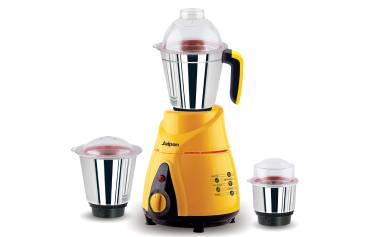
If your mixer grinder blade is wobbling, you’ll want a quick, safe fix that actually lasts. Start by unplugging the unit, removing the jar, and checking the blade, hub, and shaft for wear, dirt, or bent parts. Clean mating surfaces, reseat and tighten the blade to spec, then spin to check for balance. There are a few simple tests and replacements that usually solve it — here’s how to proceed.
Key Takeaways
- Unplug unit, remove jar, and wear cut-resistant gloves before inspecting blade, shaft, and hub for visible damage or debris.
- Clean mating surfaces and sealing areas with a brush and isopropyl alcohol, then dry completely to ensure proper seating.
- Finger-thread blade and nut snugly, check for lateral play by rotating shaft, then tighten nut to manufacturer torque or firmly by hand.
- Inspect coupling, splines, and locking plate for wear or bent tabs; replace damaged couplers, blades, or lock components.
- If wobble remains after reseating and torquing, check bearings/shaft for play and consider professional repair or replacement.
Common Causes of a Wobbly Blade
Why is the blade wobbling? You’ll first check obvious wear: a bent blade or deformed shaft will cause lateral play and vibration. Next inspect the blade hub and coupling; stripped splines or rounded edges let the blade shift under load. Worn bearings or a loose bearing housing let the rotor tilt, creating wobble. Also consider improperly seated blade assemblies—if the blade isn’t fully seated against its shoulder or a retaining washer is missing, it’ll run off-center. Loose fasteners, such as mounting nuts or locking collars, will allow incremental movement you might not notice until vibration starts. Debris or food residue trapped between mating surfaces can prevent correct seating and mimic mechanical looseness. Finally, mismatched replacement parts—using a blade or adapter not designed for your model—can introduce tolerance issues leading to instability. You’ll approach each cause methodically, isolating one factor at a time so you can safely identify what needs repair or replacement. For long-term reliability, also verify that your mixer’s motor housing and seals match recommended durability and maintenance practices from 500W model guidelines.
Tools and Materials You’ll Need
You’ll need a few basic tools and a couple of spare parts to fix a wobbly blade. Gather a screwdriver set, adjustable wrench, needle‑nose pliers, cleaning brush, replacement gasket or sealing ring, and a new blade or shaft nut if yours is worn. Lay everything out before you start so you can work methodically. Also inspect gaskets and lids for damage and replace them as needed to prevent leaks and ensure a secure seal with the jar gasket inspection.
Required Tools List
What do you need to gather before you start? A precise, safe toolkit makes the job quick and prevents damage. You’ll need a set of insulated screwdrivers (flat and Phillips) sized for appliance screws, and a small adjustable wrench or socket set to fit the blade nut. Include a pair of needle-nose pliers for holding small parts and a rubber jar opener or strap wrench to steady the jar base. A torx bit set may be necessary for some models. Keep a clean microfiber cloth and a soft-bristled brush to remove debris. Have safety gloves and safety glasses on hand. Finally, a flashlight or headlamp helps you inspect tight spaces. Lay everything out on a clean, stable surface. Philips models often feature a sturdier ABS shell and rubberized feet that aid stability during repairs, so take extra care when working with sturdier ABS shells.
Spare Parts & Materials
Need specific spare parts and small consumables on hand before you start—having them ready will save trips mid-repair and prevent makeshift fixes. You’ll want replacement blades or blade assemblies matched to your model, a new coupling or rubber drive if worn, and genuine or high-quality aftermarket seals and gaskets to maintain safe containment. Keep a small assortment of screws, washers, and a locking nut if your unit uses one. Include threadlocker (medium strength), food-safe grease, and a lint-free cloth. Have disposable gloves, safety glasses, and a small container for removed fasteners. Verify part numbers against your manual or manufacturer website before buying. Store parts cleanly and label them so you can work methodically and minimize contamination or installation errors. Also consider keeping a spare rubber drive or coupling since regular inspection of couplers is recommended for durability and safe operation.
Safety Precautions Before You Start
Before you touch the grinder, make sure it’s unplugged and the jar removed so parts can’t move unexpectedly. Wear cut-resistant gloves and safety glasses to protect your hands and eyes from sharp edges and flying debris. Work on a stable, well-lit surface to keep small parts visible and prevent slips. Keep children and pets away from the work area. Have a clean cloth or tray ready to collect screws, washers, and bearings so nothing gets lost.
Check the appliance for visible damage—cracked housings, exposed wires, or burnt smells—and don’t proceed if electrical hazards are present; get professional help. Keep a small first-aid kit nearby in case of minor cuts. Use the correct tools, avoid makeshift levers, and apply steady, controlled force when loosening fasteners. Note the orientation of parts as you work so reassembly is accurate. Take your time; rushing increases risk. If you feel unsure at any step, stop and consult a technician. Also perform basic maintenance checks—like inspecting seals, blades, and the power cord—before reassembly to ensure safe operation.
How to Remove the Jar and Blade Assembly
Make sure the grinder is unplugged before you touch the jar or blade. Place the jar on a flat, stable surface and hold it firmly. Grip the base and twist counterclockwise to unscrew and remove the blade assembly. Always wear cut-resistant gloves and eye protection when handling blades to prevent injury.
Ensure Power Is Disconnected
Disconnect the mixer grinder from the mains and unplug the cord so there’s no chance of the motor starting while you work. Confirm visually that the plug is fully out and the switch is off. If your unit has a removable fuse or isolation switch, open or remove it for extra safety. Wait at least 30 seconds to allow any residual charge to dissipate in electronic models. Keep the plug and cord away from wet surfaces. Don protective gloves if blades are exposed when removing the jar. Treat all controls as if they could energize. Don’t rely on the jar’s locking mechanism alone; the power being disconnected is the primary safeguard. Once unplugged and confirmed, you can safely proceed to remove the jar and blade assembly. Consider checking the hard food-grade stainless blades and coupler for wear before reassembly.
Secure Jar on Flat Surface
Where will you work? Choose a clean, dry, well-lit counter or table away from edges and traffic. Clear the area of clutter, liquids, and children or pets. Place a non-slip mat or damp cloth to prevent shifting. Set the jar upright and check that its lid and external parts are removed so you can access the base safely.
Hold the jar firmly with your non-dominant hand near its midpoint, fingers spread and away from the blade end. Rest your forearm against the work surface to steady the jar. If the jar is heavy or full, empty and wipe it dry first. Keep your dominant hand free to handle tools or to support the base when you lift; never work with wet hands. Always unplug the unit before assembling, disassembling, cleaning, or touching blades to reduce the risk of electric shock and injury, and ensure the outlet is properly grounded.
Twist Base Counterclockwise
Ready to remove the jar and blade assembly? Place the jar on a stable, flat surface and ensure the grinder is unplugged. Wear cut-resistant gloves to protect your hands. Grip the jar body firmly with one hand and the blade base with the other. Keep your thumbs clear of the blade area. Twist the blade base counterclockwise—apply steady, even pressure; don’t jerk. If it’s stiff, tap the base gently with a wooden mallet or run warm water over the joint to loosen residue, then try again. Once loosened, continue turning until the base detaches. Lift the blade assembly straight out, keeping fingers away from the edges. Inspect the sealing ring and threads for wear or debris before reassembling. Store parts safely while you clean or replace components. If the motor was hot or the unit smelled like burning, allow it to cool and inspect for overheating indicators before reusing.
Inspecting the Blade, Shaft, and Seals for Wear
Before you reassemble anything, take a careful look at the blade, shaft, and seals to spot wear that could be causing looseness. Begin by unplugging the unit and removing the jar so you can inspect components safely. Hold the blade assembly and examine blade edges for chips, bending, or uneven wear—dull or damaged blades can wobble. Check the shaft where the blade mounts: if it’s scored, bent, or shows grooves, it won’t seat tightly. Rotate the shaft by hand; any play or wobble at the bearing point indicates wear.
Inspect rubber or silicone seals and gaskets for cracks, compression set, or hardening. Damaged seals let the blade sit unevenly and can cause vibration. Look for debris trapped under seals or around the shaft; clean thoroughly with a brush and mild detergent, then dry completely. If you find damage to blades, shaft, or seals, replace those parts before reassembly to restore safe, stable operation. Higher-wattage motors (such as 750W models) are generally built for tougher workloads and may show different wear patterns under heavy use.
Tightening the Blade Nut and Locking Mechanism
Start by checking the blade nut fit: you should be able to thread it snugly by hand without wobble. Then inspect the locking mechanism—look for worn splines, bent tabs, or missing springs that keep the nut from holding. If anything looks damaged or loose, note it before attempting to tighten or replace parts.
Check Blade Nut Fit
Wondering whether the blade nut is the cause of wobble? You’ll check fit, torque, and wear methodically. Unplug the grinder, remove the jar, and hold the blade assembly steady. Inspect the nut for stripped threads, rounded edges, or dirt. Hand-tighten, then use the correct-sized spanner; it should seat firmly without play. If it tightens but loosens quickly, the nut or spindle may be worn—replace before reuse. After fitting, test rotation by spinning the blade by hand to confirm no lateral movement.
| Step | What to check | Action |
|---|---|---|
| 1 | Nut cleanliness | Clean threads |
| 2 | Thread condition | Inspect for damage |
| 3 | Fit/tightness | Hand then wrench-tighten |
| 4 | Post-fit test | Spin to confirm no play |
Inspect Locking Mechanism
Although the blade nut is often the culprit, you’ll also want to inspect the grinder’s locking mechanism to make sure the nut can hold torque without slipping; unplug and remove the jar, then examine the lock plate, tabs, or spring clips for wear, bending, or debris that prevents full engagement. Check that the locking plate sits flush and that any notches align with the blade shaft. Look for rounded edges, metal fatigue, or missing teeth that reduce bite. Clean contacts with a brush and isopropyl alcohol, then dry fully. If tabs or springs are bent, gently reshape with pliers or replace the part. Reassemble and hand-tighten the nut, then run briefly while observing for movement. If slipping continues, stop and replace worn components.
Replacing a Damaged Blade or Bearing
Need to replace a visibly damaged blade or a worn bearing? Disconnect the grinder from power and remove the jar. Wear cut-resistant gloves and safety glasses. Empty the jar and secure it to avoid slipping.
Follow the manufacturer’s disassembly steps: remove the retaining nut, washer, and blade assembly. Inspect parts; if the blade shows cracks, bends, or significant corrosion, replace it. If the bearing feels rough, noisy, or has lateral play, replace the bearing or the entire shaft assembly as specified by the manual.
Buy OEM or compatible replacements matching model number. Clean mating surfaces and check seals; replace any damaged gaskets. Fit the new bearing or blade in the reverse order, ensuring parts seat fully and fasteners are torqued to spec—don’t overtighten. Reassemble the jar, reconnect power, and perform a brief no-load run to confirm smooth operation and absence of unusual noise. If anything seems off, stop and consult a service technician.
Realigning the Blade and Checking for Balance
How do you make sure the blade spins true after replacing parts? First, keep the grinder unplugged and wear cut-resistant gloves. Mount the blade and nut finger-tight, then manually rotate the shaft to check for wobble. If the blade visibly wobbles, loosen and reseat it, ensuring the blade sits flush on the hub and any locating pin or key fits correctly.
Tighten the nut to the manufacturer’s torque spec; if you don’t have a torque tool, tighten securely but avoid over-torquing. Recheck rotation by spinning the blade slowly with your hand; there should be no side-to-side movement. For a finer check, use a fixed pointer (a toothpick held close to the blade edge) to detect runout as you rotate — maintain a small, consistent gap.
If imbalance persists, swap blades or add a thin, even shim between blade and hub only as a last resort. Reassemble housing, plug in, and run briefly at low speed while standing clear to confirm smooth, vibration-free operation.
Routine Maintenance to Prevent Future Looseness
Once the blade is running true, you’ll want a simple maintenance routine to keep parts tight and aligned over time. Weekly: unplug the grinder, remove the jar and blade assembly, wipe the shaft and sealing surfaces with a clean, dry cloth, and inspect for wear, cracks, or burrs. Tighten the blade nut to the manufacturer’s torque spec—use a torque wrench if available—or snug it firmly by hand with the correct tool; avoid overtightening. Monthly: disassemble the coupling and wash components, dry thoroughly, and lightly lubricate moving metal-on-metal contact with food-safe lubricant if specified in the manual. Check rubber gaskets and dampers for compression or hardening; replace worn items promptly. After any heavy or unusually noisy run, repeat inspection and balance check before the next use. Keep a log of maintenance actions and parts replaced. Always work with the unit unplugged and blades secured to prevent accidental starts.
When to Contact a Professional Repair Service
When should you call a pro? You should contact a professional when the issue exceeds basic, safe DIY steps. If the motor hums but blades won’t tighten, if electrical smells or sparks appear, or if fixed fasteners strip repeatedly, stop and get expert help to avoid injury or further damage.
Use a technician when:
- You can’t access the coupling without dismantling sealed parts.
- You lack proper tools to measure tolerances or replace bearings.
- The grinder shows intermittent power or overheating.
| Symptom | Action |
|---|---|
| Motor noise or burning odor | Unplug and call pro |
| Stripped threads or damaged coupling | Avoid force; seek service |
| Intermittent power or overheating | Don’t use; get inspection |
When you contact a repair service, describe symptoms clearly, note model and purchase date, and ask about safety checks, parts warranty, and estimated time. Prioritize certified technicians to ensure safe, lasting repairs.
Frequently Asked Questions
Can a Loose Blade Damage the Motor Over Time?
Yes — a loose blade can damage the motor over time. You’ll get vibration, extra load and bearing wear, plus overheating. Stop using it, tighten or replace the blade assembly, and inspect motor bearings for safety.
Will Using a Different Jar Void the Warranty?
Usually yes — using a non‑approved jar can void warranty. You should check warranty terms, keep original parts, and contact the manufacturer if unsure. Don’t risk safety or damage by using incompatible accessories.
Can I Sharpen Blender Blades at Home Safely?
Yes, you can safely sharpen blender blades at home if you’re careful. Unplug, remove blade assembly, secure it, use a fine file or sharpening stone at original bevel, wear gloves and eye protection, reassemble and test cautiously.
Are There Aftermarket Parts Compatible With My Grinder Model?
Yes — you can find aftermarket parts for many models, but you’ll need to verify compatibility via model number, vendor specs, and safety certifications; always choose reputable suppliers, check fitment charts, and avoid uncertified components that could cause hazards.
How Often Should Seals and Gaskets Be Replaced?
Replace seals and gaskets every 12–24 months, or sooner if you spot cracks, hardening, leaks, or odors; for heavy use replace annually. Always use manufacturer‑spec or compatible parts and inspect them during routine maintenance.